Software updates
New Feature – File Manager
May
Introducing the New File Manager: Your Fleet’s Digital Filing Cabinet
At TrackerWay, we’re always striving to make your fleet management experience smoother, smarter, and more secure. That’s why we’re excited to announce the launch of our latest feature: File Manager-a powerful new tool designed to centralize and safeguard all your vehicle-related documents in one easy-to-access location.
Why File Management Matters
Managing a fleet isn’t just about tracking vehicles in real time. It’s also about keeping track of the countless documents and files that come with every vehicle: registration papers, insurance certificates, maintenance records, driver contracts, compliance forms, and more. These documents are essential for smooth operations and regulatory compliance-but they’re often scattered across emails, desktops, and filing cabinets.
With the new File Manager, TrackerWay brings all your fleet’s critical documents together in a secure, organized, and easily accessible digital space.
What Can You Do With File Manager?
1. Upload and Organize Files Effortlessly
You can now upload any file-PDFs, images, spreadsheets, or documents-directly to TrackerWay. Create folders for each vehicle, department, or document type, and drag-and-drop files for instant organization. No more searching through emails or physical folders!
2. Secure Storage and Access
Your data’s security is our top priority. All files uploaded to File Manager are encrypted and stored securely in the cloud. You control who has access to what, ensuring sensitive documents are only visible to authorized team members.
3. Centralized Information for Each Vehicle
Attach files directly to specific vehicles or groups. Need to check the latest maintenance report or insurance renewal for a particular truck? It’s all just a click away, right from your TrackerWay dashboard.
4. Streamlined Collaboration
Share files and folders with your team, mechanics, or external partners without the hassle of email attachments. Set permissions so everyone sees exactly what they need-no more, no less.
5. Always Accessible, Anywhere
Whether you’re in the office, on the road, or working from home, File Manager is available wherever you log in to TrackerWay. Your documents are always at your fingertips, whenever you need them.
How to Get Started
Getting started with File Manager is simple:
- Log in to your TrackerWay account.
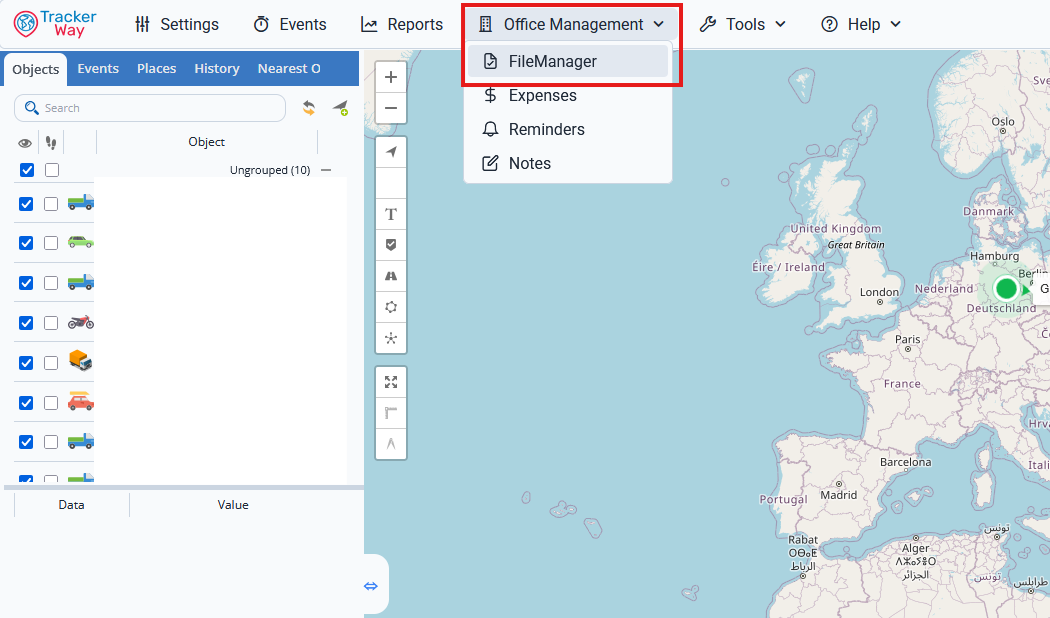
- Navigate to the new “File Manager” tab in your dashboard, which is located under “Office Management“.
- Create folders and start uploading your documents.
- Assign files to vehicles, set permissions, and enjoy a new level of organization (under development)!
The Future of Fleet Document Management
We built File Manager because we listened to you-our clients-who asked for a better way to handle the paperwork that keeps your fleet running. We believe this feature will save you time, reduce stress, and help you stay compliant and organized.
As always, we’re here to support you. If you have questions or feedback about File Manager, our team is ready to help you make the most of this new tool.
Start using File Manager today, and experience the next step in smart fleet management with TrackerWay!
