
Configure the fuel consumption for your vehicles
< 1 min read
Our pioneer GPS Tracking Software uses a complex algorithm, which is capable to provide 90% accuracy about the fuel consumption of your vehicles! You can make use of this feature, by simply adding the fuel consumption rate of your vehicles.
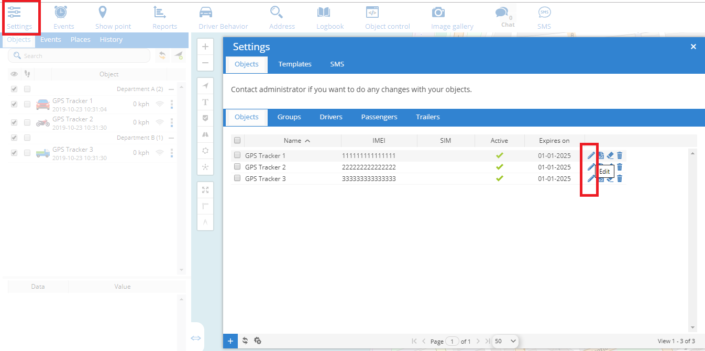
2) Once the new window appears, navigate to the ”Fuel Consumption” tab, which is highlighted with a red square in the below image:
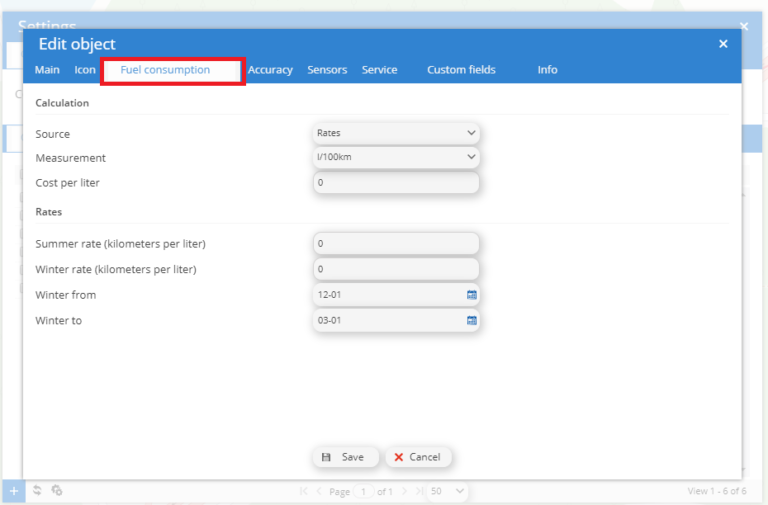
In this new window, you can edit the fuel consumption settings of your vehicle!
Source: Here you can choose the source of the fuel consumption. We recommend using Rates.
Measurement: You can choose between liters and MPG. The default setting is l/100km.
Cost per liter: Here you add the cost per fuel per liter. In our example, the liter costs 1,5euro.
Rates Summer rate (kilometers per liter): Here you type the consumption of your vehicle. In our example, the vehicle consumes 7 litres/100 km.
Rates Winter rate (kilometers per liter): Here you type the consumption of your vehicle in the winter months. In our example, the vehicle consumes 7 liters/100 km.
Winter from: Finally on the two last options you define when you want to count the winter rate (from which month of the year.)


Powered by BetterDocs