
How can i add sensors on my devices?
1 min read
Adding sensors to your GPS Tracker device will allow you to increase the capabilities and enhance the features your GPS Tracker devices provide you! Our pioneer Tracking Software accepts a variety of sensors, however, in the first place, your GPS Tracker device is responsible for providing us with the proper details. Therefore it is crucial to enable all the appropriate I/O (input/output) sources of your GPS Tracker device, in order to provide the software with all the required details in order to present the findings from your sensors.
We strongly recommend checking the user manual of your GPS Tracker device, before continuing on.
1) On the GPS Tracker device you want to add sensors, click on the dots icon and then click on the “Edit” button.

2) On the new window that will appear, click on the “Sensors” tab and then click the “+” icon at the bottom left corner, as it appears in the figure below.
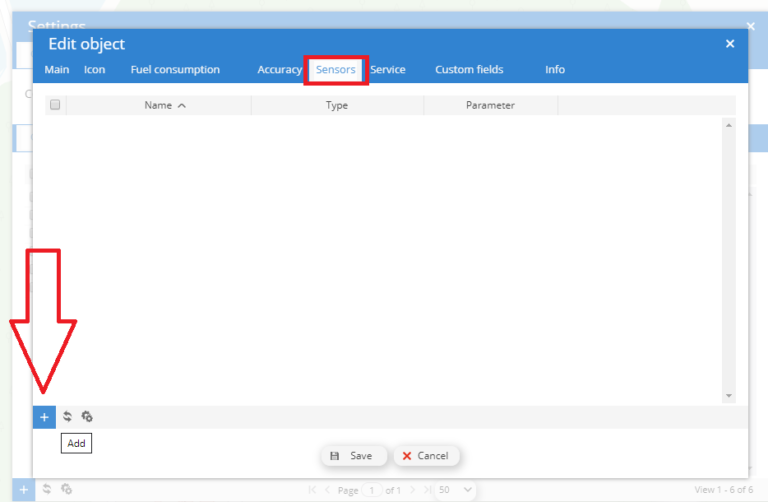
3) On the new window that will appear (figure below) you will see the “Sensors Properties” window. From there you can add all the appropriate details about your new sensor.
4) Hint: The sensors’ parameters depend on your GPS Tracker devices. A quick guide about the sensor parameters can be found here. If you need any further assistance with adding sensors to your account, contact us!


Powered by BetterDocs